Access Code Recovery
Introduction
The Access Code Recovery system manages how Access Codes are handled within the application and server, ensuring secure access to encrypted messages while balancing convenience and security. The system supports three modes of operation: Disabled, Hybrid, and Auto.
The Access Code Recovery mode is configured by the Admin, determining how users interact with access codes and their recovery options.
Access Code Recovery Modes
Disabled Mode
- Default mode when no access code recovery mode is set by the server.
- User-Managed Access Codes: Users are solely responsible for storing and entering their own Access Code.
- No Server Storage: The Access Code is never stored or backed up online.
- No Recovery Option: If the user forgets the Access Code, recovery is not possible.
- Use Case: Ideal for security-conscious users who prioritize complete end-to-end encryption and full control over their encryption keys.
Hybrid Mode
- User-Generated Access Code: Users manually set their own Access Code, which is securely stored on the server.
- Automatic Updates: When users change their Access Code, the stored version on the server is updated accordingly.
- Flexible Restoration: If a user loses their Access Code, they can contact the server admin to request recovery.
- Use Case: A balance between security and convenience, allowing recovery via an admin without the risk of completely losing data.
How Hybrid Mode Works:
- Users set their Access Code.
- The Access Code is encrypted and stored on the server.
- If the user forgets their Access Code, they must contact the Admin for assistance.
Auto Mode
- Fully Automated Management: The system handles Access Codes end-to-end without user intervention.
- Server-Managed: Access Codes are securely created, stored, and fetched automatically during:
- Account Registration
- Future Logins
- Device Setups
- No User Input Required: Users do not need to enter or remember their Access Code, making setup seamless.
- Use Case: Ideal for organizations that prioritize the ease of users' interactions and quick setup on new devices, trusting the admin system’s security.
How Auto Mode Works:
- When a user registers an account, the system automatically generates an Access Code.
- The Access Code is stored securely on the server.
- During future logins, the system automatically retrieves and applies the Access Code.
Viewing the Access Code Recovery Information
Users can check and verify their current Access Code Recovery mode by navigating to:
📌 Settings → Security & Privacy → Access Code Recovery Method (Available on Desktop/Web Apps)
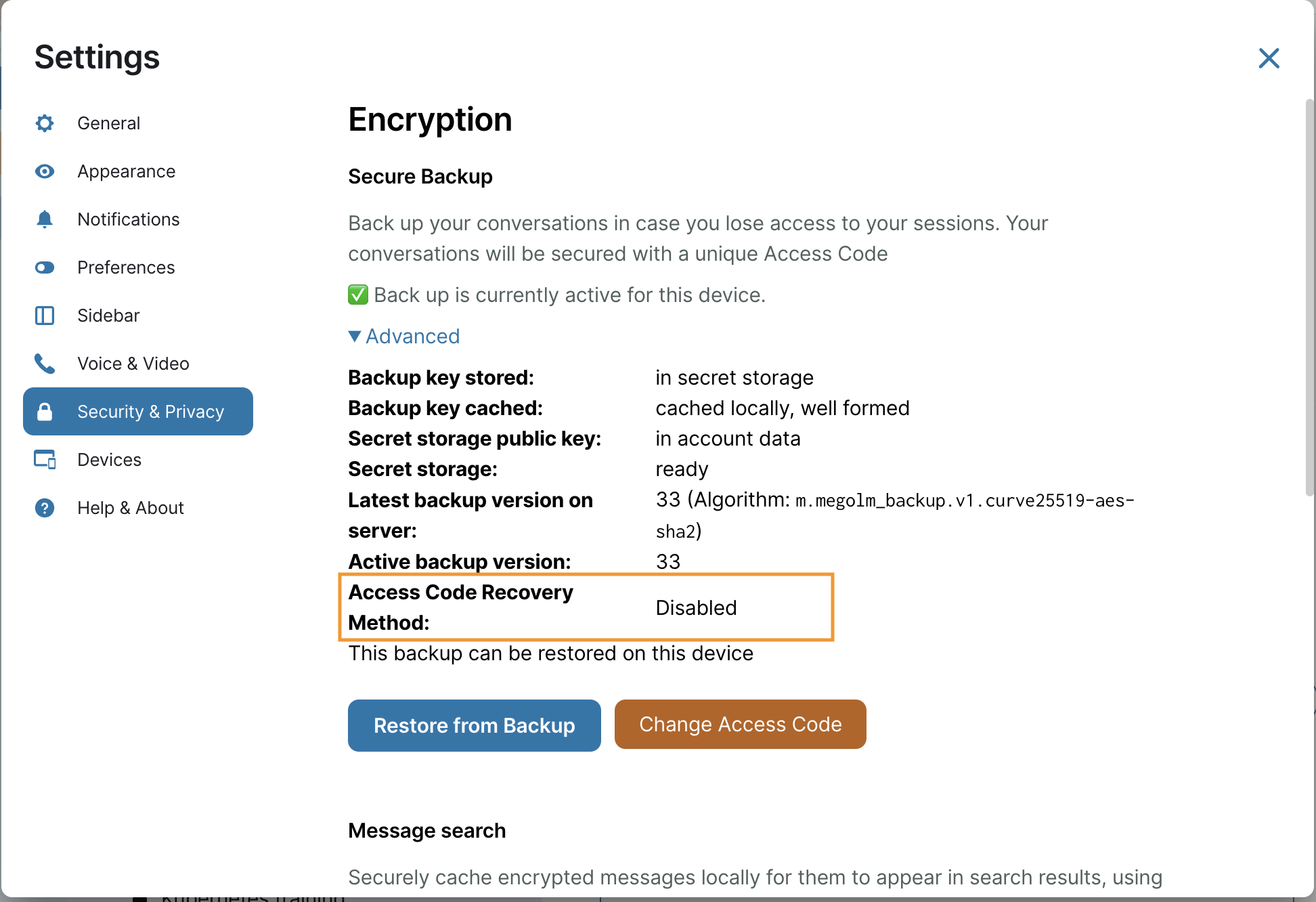
This section provides details on the selected Access Code Recovery mode and its implications.
Summary
The Access Code Recovery system offers three flexible options to match different security needs:
| Mode | Description |
|---|---|
| Disabled | Users control their own Access Code with no server storage, ensuring full end-to-end encryption. |
| Hybrid | Users generate their own Access Code, which is securely stored on the server for admin-assisted recovery. |
| Auto | The system automatically generates and manages Access Codes, requiring no user input for a seamless experience. |
Each mode is designed to provide varying levels of security and convenience, allowing organisations to choose the best option for their needs.
Security Best Practices
To ensure the best security while using the Access Code Recovery system, consider the following recommendations:
- Use a strong Access Code if Hybrid Mode is enabled to prevent unauthorized access.
- Use an Access Code different from your personal passwords to enhance security.
- Verify your security settings to confirm that your Access Code is correctly stored or backed up.
- Keep your device secure by using strong passwords and avoiding unauthorized access.